Edition guidance updated 28 October 2026 for 1.2.0. Earlier instructions described 0.1.4. This remains a hypothetical staging procedure, not a claim that these tests ran on your installation.
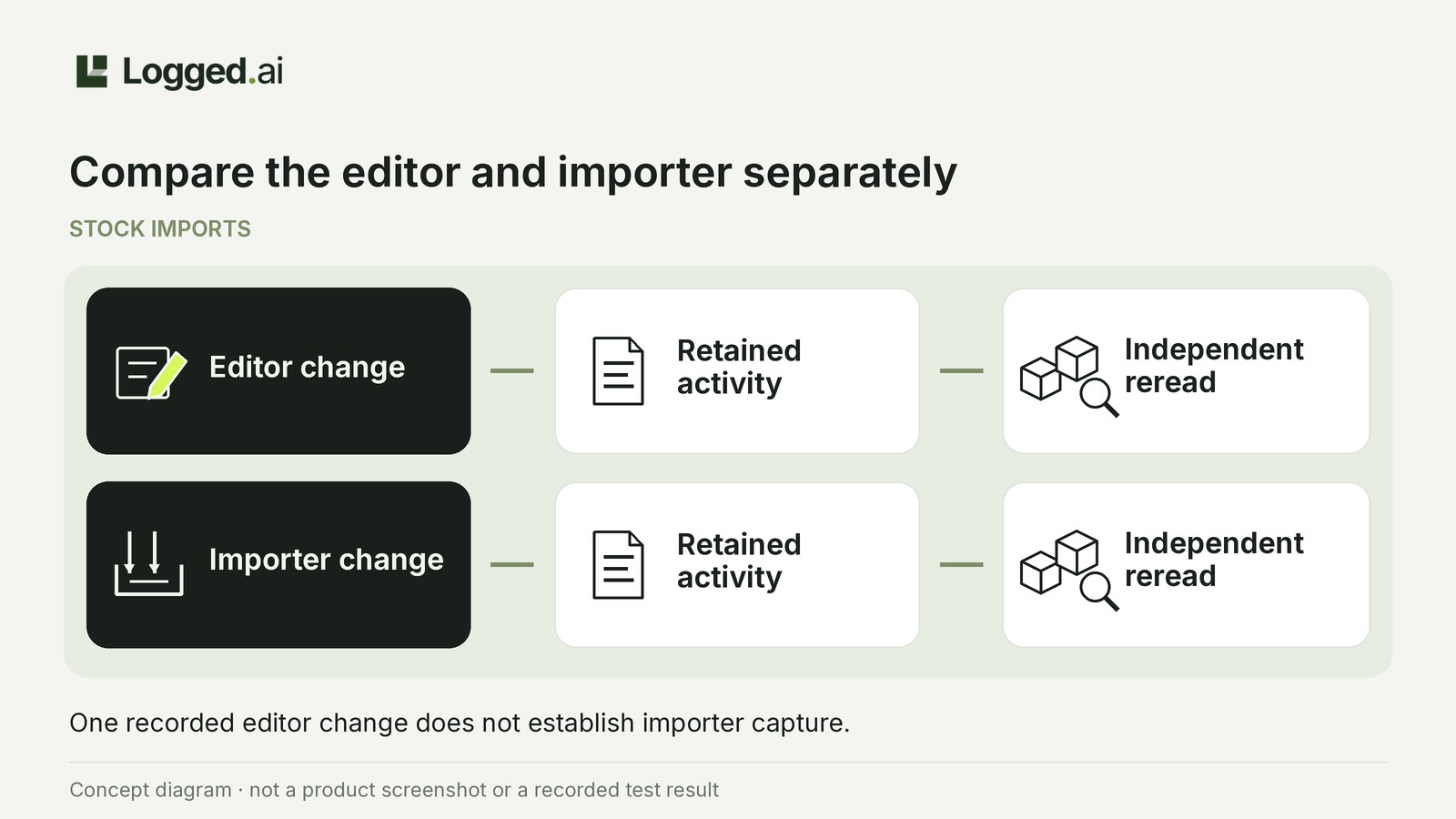
Test Logged.ai Free with two separately timed stock changes to one dummy product on isolated staging: one through the WooCommerce editor and one through your actual importer. Keep your own notes of quantities and times, then compare them with retained activity.
Assess each path separately: a detailed editor record does not validate importer capture. Free includes supported WooCommerce activity, but the website’s stock-update illustration does not establish compatibility with your importer.
This tests evidence capture, not importer correctness, physical stock accuracy or warehouse movement.
Prepare safely on staging
Use Free 1.2.0 on backed-up staging with WordPress 7.0+, PHP 8.0+ and MySQL/MariaDB. SQLite and WordPress Playground are unsupported. Read the package compatibility notes and installation requirements. Pro is not required.
Have the site maintainer confirm that the importer, connected inventory services and queued retries cannot update production stock or trigger real fulfilment. Logged.ai does not provide this isolation. If you cannot establish it, stop.
Choose a dummy product and isolated input. Prevent other people or processes from changing its quantity during the run. Viewing evidence does not itself authorize settings changes, so involve an appropriately authorized administrator.
Prepare the two-path evidence worksheet
Define your question: quantity history alone, or also who made the change. Copy these fields into your own notes, keeping product rereads separate from retained evidence.
Shared configuration: Staging site, product ID/SKU, software versions, relevant collection and importer settings, and differences from production.
Editor
- Timing: Start, finish, time zone and evidence-review time.
- Quantities: Observed before, requested after and independently reread after.
- Retained evidence: Record reference, affected object, displayed time, stock values, outcome, actor and execution channel; mark absent details.
- Conclusion: Classification, question answered, missing facts and next evidence source.
Importer
- Timing and job: Start, finish, time zone, evidence-review time, job reference and reported state if available.
- Quantities: Observed before, requested after and independently reread after.
- Retained evidence: Record reference, affected object, displayed time, stock values, outcome, actor and execution channel; mark absent details.
- Conclusion: Classification, question answered, missing facts and next evidence source.
Run the editor check, then the import
1. Make and inspect the editor change
In a hypothetical run, the product starts at 20 units and the editor change requests 17. Note your actual starting quantity and time, save the change, then reopen the product and record its displayed quantity and finish time. The numbers are illustrative inputs, not results.
Immediately open Logged.ai → Activity → Events on staging. Use available filters to narrow retained activity, then inspect candidate records against your product and time window. Read the actor, affected object, execution channel and observed outcome separately. Record only stock values actually present; before/after values may be minimized or unavailable.
2. Investigate a missing editor record
If the editor record is absent:
- Confirm the correct WordPress site and reset Activity filters.
- Check Settings → Collection controls for exclusions and Privacy and retention for the relevant period.
- Open Settings → System status; read collection, retention and background-work states, preserving failure codes and times.
Collection controls affect capture; filters only select retained records. Follow the missing-activity checks. If you change configuration, use the form’s own Save or Apply action, verify the saved result and start a fresh run for both paths.
If the editor record remains absent, record that limitation. A later missing importer record cannot establish incompatibility.
3. Make and inspect the importer change
In a later, non-overlapping window, reread the product and use your actual importer; the illustrative requested final quantity is 11. Note any job reference and reported state. Confirm completion through the importer’s own workflow, reopen the product, record the displayed quantity and inspect activity as above.
Never substitute requested quantities for rereads. If the reread differs from the requested quantity, another person or process changes stock, or evidence conflicts with your notes, preserve the discrepancy and investigate before repeating. Do not count conflicting evidence as a successful match.
Decide what each path can answer
Classify each path as recorded with sufficient detail, recorded with important gaps or not observed in this run, relative to your question. A product-update record without stock values cannot establish a specific quantity change.
Leave unknown actors unknown; never assign a background action to the reviewing administrator. Useful quantity history can still leave “who changed it?” unanswered.
TRY THE SCENARIOS
What can the 17-to-11 import establish?
Hypothetical example: product rereads confirm 17 before the import and 11 afterward, with no competing stock changes. The question is quantity history.
Matching stock-change details
Recorded with sufficient detail: matching product, timing, outcome and 17-to-11 stock values answer this run’s quantity-history question. Keep your independent notes; importer records may help with unresolved attribution.
A generic product-update record
Recorded with important gaps: the record supports only the operation and outcome it reports, not the 17-to-11 change. Consult importer job records, where available, alongside your independent quantities.
No matching retained record
Not observed in this run: after collection and visibility checks, the timeline cannot answer the quantity-history question. Use importer job records, where available, and your independent notes.
Compare all scenarios
| Situation | What happens |
|---|---|
| Matching stock-change details | Recorded with sufficient detail: matching product, timing, outcome and 17-to-11 stock values answer this run’s quantity-history question. Keep your independent notes; importer records may help with unresolved attribution. |
| A generic product-update record | Recorded with important gaps: the record supports only the operation and outcome it reports, not the 17-to-11 change. Consult importer job records, where available, alongside your independent quantities. |
| No matching retained record | Not observed in this run: after collection and visibility checks, the timeline cannot answer the quantity-history question. Use importer job records, where available, and your independent notes. |
Illustrative examples. Your selection is not saved or sent, and changes no store settings.
An absent record does not prove that no update occurred or reveal the importer’s write method. Logged.ai cannot reconstruct unsupported direct database edits, events missed before activation or during gaps, or records removed by retention. Local storage does not make evidence independently immutable. Review the collection and attribution limits.
Product rereads show current quantities, not history; physical discrepancies require separate stock reconciliation. One successful staging run does not establish universal importer compatibility or guarantee future capture. Repeat after relevant software or configuration changes.
Finish with one scoped conclusion for Editor and one for Importer: what the evidence answers in this configuration, what remains unknown and which source you will consult next.